Early-stage founders make half their product decisions away from a keyboard.
A prospective customer explains why they churned during a fifteen-minute phone call. A design partner sends a three-minute WhatsApp voice note after testing a new onboarding screen. Two co-founders walk back from a coffee shop and talk through pricing changes before their next investor update.
Most of that detail disappears by the next morning. Typed notes miss exact phrasing, and raw audio files sit in folders because nobody has forty minutes free to replay yesterday's conversations from start to finish.
Turning spoken feedback and quick voice memos into tracked tasks does not require a heavy enterprise setup. A lightweight four-step habit captures every customer phrase and commitment without slowing down the conversation itself.
Why raw founder notes fail after user calls

Founders usually try one of two approaches during discovery calls, and both carry a hidden cost.
The first is typing frantic bullet points while the other person talks. Splitting your attention between a keyboard and a customer makes you miss subtle hesitation in their voice, and you end up writing down your own interpretation of a feature request rather than the customer's actual problem.
The second approach is inviting an automated calendar bot into every video call. While bots work fine for internal team standups, a third-party recording bot announcing itself in an early sales call or a candid user interview changes the room immediately.
A four-step workflow from voice clip to shipped tasks

Replacing live typing with a short post-call routine takes about two minutes per conversation and preserves the exact words your users used.
1. Capture without breaking eye contact
Ask permission to record at the start of the conversation, set your phone flat on the desk, and focus entirely on asking sharper follow-up questions.
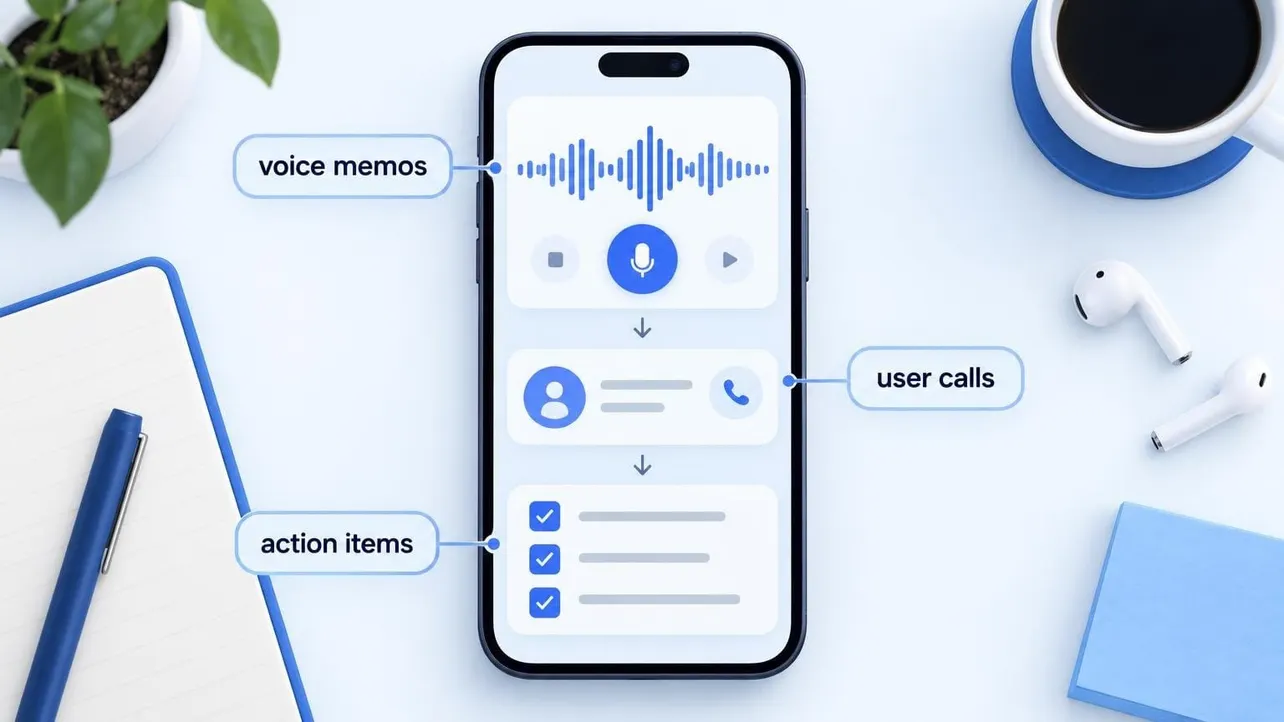
Using an AI voice note app such as Audio Notes AI lets you record on an iPhone with the screen locked, record straight in a laptop web browser, or upload an existing audio or video file in more than 60 languages. If a beta tester sends feedback as a WhatsApp or LINE voice message, forwarding it through the iOS share sheet imports the clip in one tap.
2. Pull action items within sixty seconds of hanging up
Wait too long after a call and even the best transcript becomes backlog clutter. Once a recording stops in Audio Notes AI, the transcript, a concise summary, and extracted action items are ready in about a minute.
Before opening your next tab, spend ninety seconds reviewing those action items:
- Copy concrete commitments (such as sending a pricing quote by Thursday or fixing a broken CSV import) straight into Linear, GitHub Issues, or Notion, each with one owner and a date.
- Verify tone when a point feels ambiguous. On iPhone, tapping any line in the transcript plays the audio from that exact second, so you can hear whether a prospect's comment about annual billing was a dealbreaker or an offhand remark.
- Translate cross-border feedback. If you interview users across Europe or Asia, one-tap translation turns a call in Spanish, German, Dutch, or Cantonese into clean English notes for the rest of your team.
3. Ask questions instead of rereading transcripts
A thirty-minute discovery interview produces roughly 4,000 words of text. Reading all of it before writing a product spec wastes hours every week.
Instead of skimming walls of dialogue, query the note directly. Inside a single recording, you can ask "What did they say about onboarding?" or "Which tools are they paying for today?" and get an answer grounded in what was actually said.
Once you have ten or twenty interviews synced on a Pro account, you can also connect Audio Notes AI to Claude or ChatGPT through its read-only MCP connector (app.getaudionote.com/mcp). Because access is strictly read-only, your AI assistant cannot edit or delete your notes, yet you can ask across a whole batch of calls: "Across my last eight user interviews, which pricing objection came up most often?"
4. Share recaps without leaving customer audio exposed
Co-founders, engineers, and advisors need context from user calls, not permanent cloud folders full of sensitive customer recordings. Look for tools that treat raw audio as temporary by default.
In Audio Notes AI, recordings stay on your device unless you choose to share them, server audio is deleted within 24 hours, and shared notes are encrypted on your device with AES-256 before upload. The decryption key stays inside the URL link rather than on a server, and every shared link expires automatically after 24 hours.
When a permanent written record is better, exporting a clean PDF recap takes one tap.
Comparing founder note-taking methods

Different conversations call for different setups, depending on where you talk to users and how sensitive the call is.
| Method | Best use case | Main drawback | Output speed |
|---|---|---|---|
| Live keyboard notes | Very short internal check-ins | Splits focus and paraphrases user quotes | Manual rewrite after call |
| Calendar meeting bots | Scheduled multi-person video demos | Intrusive on candid 1-on-1 discovery calls; misses phone and WhatsApp clips | 2 to 5 minutes after call |
| Direct iPhone or browser voice capture | User interviews, solo founder memos, in-person chats, and WhatsApp voice notes | Requires remembering to ask permission and press record; no automatic speaker labels yet | About 1 minute for transcript, summary, and action items |
Three rules to keep voice notes out of the graveyard

Tools do not fix startup execution if recordings pile up unread. Keep the habit tight with three simple boundaries:
- Process before switching context. Never start your next task until the action items from the call you just finished are either scheduled on your calendar or logged in your issue tracker.
- Keep solo voice memos under three minutes. When recording a product idea on a walk, state the problem, the proposed change, and the next concrete step, then stop recording so the action list stays sharp.
- Cap deep interviews under ninety minutes. Focused 30-minute discovery sessions produce clearer insights and stay well within standard 90-minute recording limits. Anyone testing the workflow can start on a free tier (Audio Notes AI includes 3 notes or 60 minutes of transcription free with no trial clock) before moving heavy interview weeks onto a monthly plan.
Founders who ship fast rarely have cleaner handwriting or longer days. They simply shorten the gap between hearing a user's problem out loud and putting a clear next step on the board.