

Most comparisons of Replit and Cursor miss the point entirely. They treat it like a feature race — who has better autocomplete, whose agent is smarter, which pricing model works out cheaper — when the real question is much simpler.
What kind of builder are you, and what are you trying to ship?
Replit and Cursor are both excellent tools in 2026. They're just excellent at completely different things, for completely different people. Getting this wrong means paying for the wrong thing and spending weeks fighting a tool that was never built for your workflow.
So let's get into it.
What They Actually Are
Cursor is a VS Code fork rebuilt around AI. It runs locally on your machine, reads your entire codebase, and gives you a deeply integrated AI layer — inline suggestions, multi-file editing through Composer, agent mode that plans and executes complex tasks, and the ability to switch between Claude, GPT-4o, and Gemini mid-session.
Your code stays on your machine. Your infrastructure, your CI/CD pipeline, your deployment choice — all under your control.
Replit is an entirely different thing. It's a browser-based cloud development environment where you open a tab, describe what you want to build, and Agent 3 starts constructing it.
No installation. No local setup. No dependency management. Everything (the IDE, the runtime, the database, the hosting) lives in Replit's cloud. You go from idea to a shareable live URL without touching a terminal.
Same category on paper. Completely different products in practice.
The Agent Experience
This is where the gap becomes most visible.
Cursor's Composer is a multi-file editing panel you direct. You stay in control — Cursor proposes changes, shows you diffs, and applies them when you approve. It's AI as a co-pilot.
The better your prompts and your understanding of your codebase, the better your results. Background Agents can run tasks in parallel cloud sandboxes while you keep working, and Plan Mode maps out a full execution plan before touching anything.
Replit's Agent 3 is built around a different philosophy entirely. You describe a goal — "build a SaaS dashboard with auth and Stripe integration" — and Agent 3 handles the entire development lifecycle autonomously.
It plans the architecture, writes the code, provisions the database, runs the app in an actual browser, identifies bugs, fixes them, and iterates, all without you writing a line. It can run for up to 200 minutes continuously. You can start a project before bed and find significant progress in the morning.
That self-testing browser loop is genuinely impressive. Agent 3 doesn't just write code and hope — it executes the app, clicks through it like a user would, and fixes what breaks. For non-technical founders who want an end-to-end result without writing code themselves, this is currently the best tool available.
The trade-off: Agent 3's architectural decisions can be opaque, and Reddit developers consistently warn to review what it produces before treating it as production-ready. It's an exceptional junior developer, not a senior one.
Development Environment
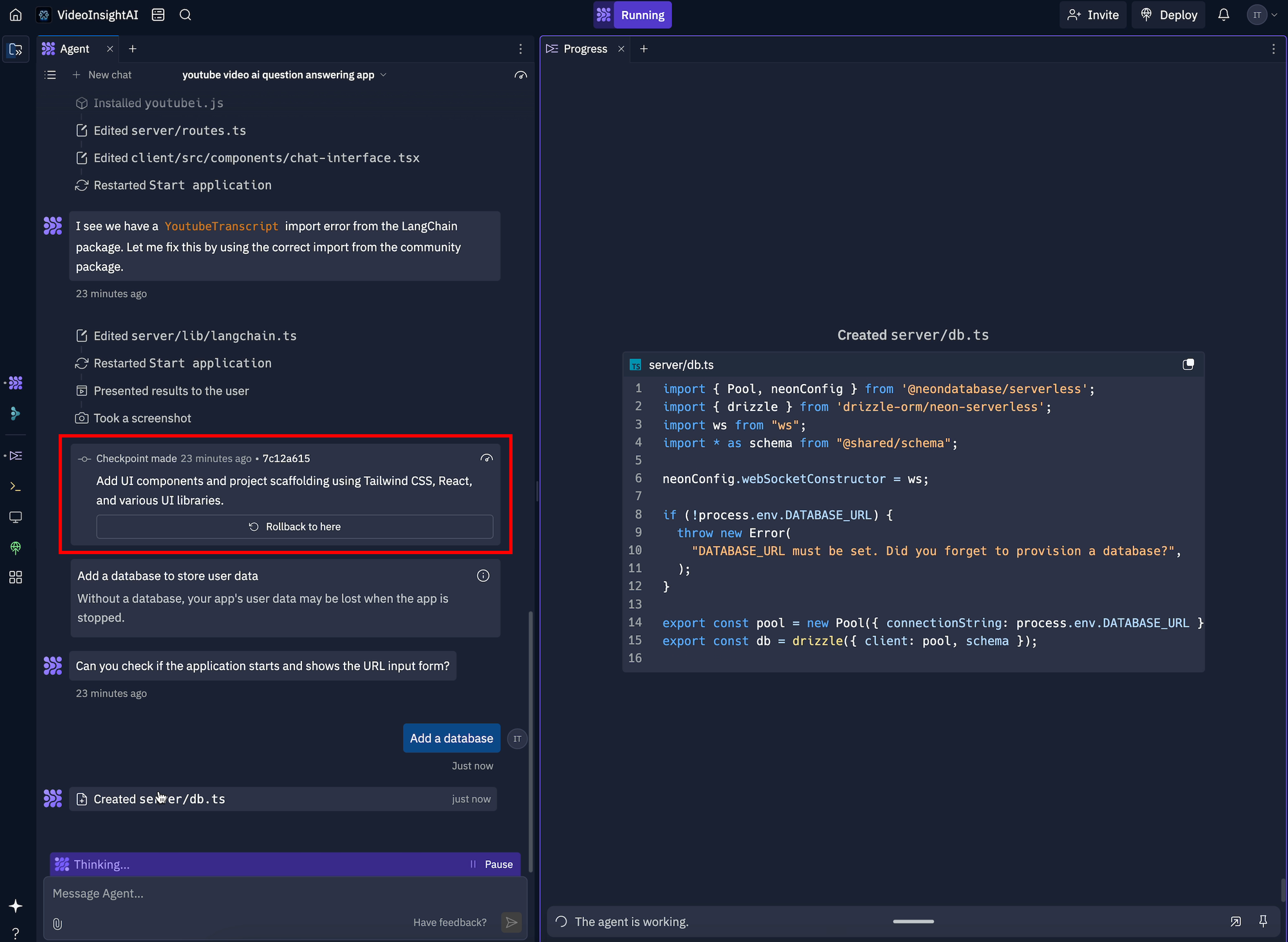
Replit runs entirely in your browser.
Open it on your phone, your iPad, your work laptop, someone else's computer and your project is always there, always in the same state, always deployable. There's no "works on my machine" problem because there's only one machine: Replit's cloud.
Real-time multiplayer lets multiple people edit the same project simultaneously, which makes it legitimately useful for early-stage teams collaborating on prototypes.
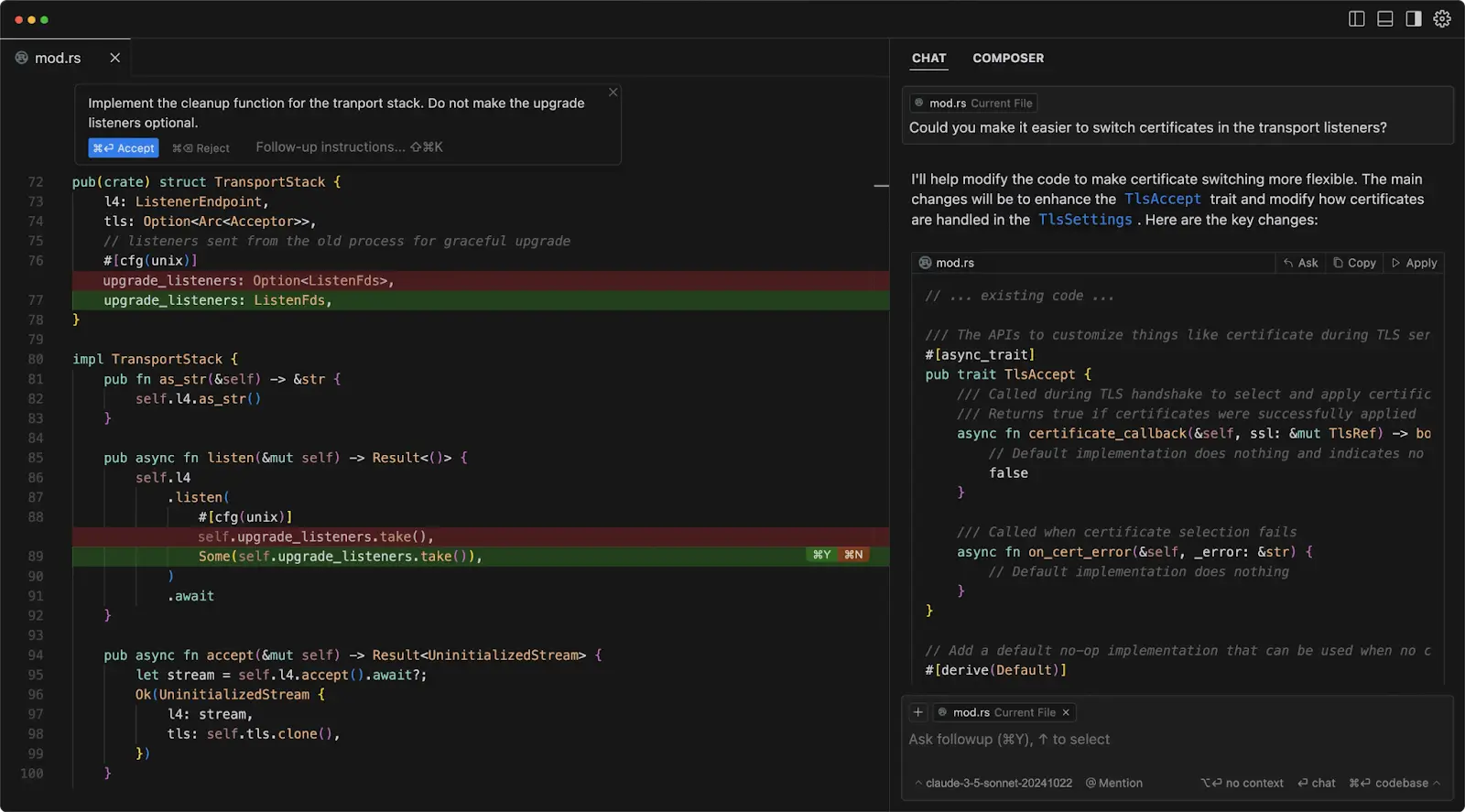
Cursor runs locally. That means full desktop performance — your CPU, your GPU, your RAM handling everything. For large repositories (hundreds of files, complex interdependencies), local execution is noticeably faster and more reliable than cloud-based alternatives.
Your code doesn't leave your machine unless you explicitly push it somewhere, which matters for proprietary codebases and anything security-sensitive.
The flip side: you need to install Cursor, manage your local environment, and handle deployment yourself. For someone who just wants to build and ship something quickly, that friction is real.
Code Ownership and the Lock-In Question
This is the one most people don't ask about upfront and regret later.
With Cursor, you own everything. Your code lives in your local file system, in your Git repository, deployed wherever you want. Cursor is a tool you use, not a platform you depend on. If Cursor shut down tomorrow, your codebase is entirely intact and you switch to another editor in an afternoon.
With Replit, the picture is more complicated. You can download your code as a ZIP or connect to GitHub — you're not fully locked in — but your infrastructure is deeply integrated with Replit's platform. Databases, deployments, environment variables, and background services all live inside Replit's ecosystem.
Moving a mature Replit project to a different hosting setup requires meaningful refactoring work. One developer who built extensively on Replit described it bluntly: "The generated code was tightly coupled to Replit's infrastructure. Moving it elsewhere would require significant refactoring. Best for prototypes you'll throw away."
That's not a dealbreaker (plenty of production apps run happily on Replit) but it's a decision you should make consciously rather than discover later.
Security and Privacy
Cursor keeps your code local. Codebase indexing sends data to AI providers (Anthropic, OpenAI) for processing, but Cursor offers Privacy Mode which prevents your code from being used in model training.
For most teams, this is a reasonable trade-off. For highly regulated industries or air-gapped environments, it's worth reading Cursor's data handling documentation carefully.
Replit stores your code and data in their cloud. Enterprise plans include SOC 2 Type 2 certification, SAML SSO, and AES-256 encryption.
There was a notable 2025 incident where an AI agent deleted a production database, which prompted Replit to introduce snapshot and sandbox isolation improvements. Enterprise plans now offer private deployment options for sensitive codebases.
Pricing
Replit — pricing
Starter
Free
Basic cloud IDE, limited agent access
Core
$20/mo
Includes $25 usage credits, full Agent 3
Pro
$100/mo
Higher credit discounts, 28-day data retention, priority support
Teams
$35/user/mo
Role-based access, private deployments, pooled credits
One thing worth flagging on costs: Replit's effort-based credit model means complex Agent 3 sessions can burn through your monthly $25 allocation surprisingly fast. Debugging loops are particularly credit-hungry.
Cursor — pricing
Hobby
Free
Limited agent requests & completions
Pro
$20/mo
Unlimited completions, Cloud Agents
Pro+
$60/mo
3x usage credits vs Pro
Ultra
$200/mo
20x credits, heavy workloads
Teams
$40/user/mo
Centralised billing & admin
For a three-person team on the Teams plan, you're looking at around $420/month, a meaningful budget for an early-stage startup. Cursor's credit model has its own unpredictability since the June 2025 usage-based billing shift, but for most Pro users doing normal development, $20/month holds up well.
Real-World Use Cases
Replit wins for:
Going from zero to deployed app without technical knowledge. No tool gets a non-technical founder to a shareable, functional prototype faster.
Replit's CEO has said the vision is enabling "anyone from anywhere to take an idea to application regardless of coding experience" and in 2026, they've come closer to delivering that than anyone else.
Collaborative prototyping where multiple people need to look at the same thing simultaneously. Hackathons. MVPs you need to show investors next week. Internal tools where a small team wants to build something useful without setting up infrastructure.
Cursor wins for:
Professional developers building on existing codebases.
Once your project has real complexity (multiple services, established patterns, a team with code standards) Cursor's deep repo understanding and precise control becomes the more valuable thing. Replit's convenience starts to feel limiting; Cursor's local-first approach starts to feel like an asset.
Any project involving proprietary code, client data, or regulatory requirements where you need to know exactly what goes where. Long-term codebases you'll be maintaining and expanding for years. Any workflow that integrates with existing CI/CD pipelines, internal tooling, or complex deployment setups.
The Verdict
If you're a non-technical founder building your first product: Start with Replit. You'll have something to show people in hours instead of weeks, the hosting is handled, and Agent 3 will get you further than you expect before you hit its limitations. When you outgrow it (and you will) you'll have learned enough to make the switch to Cursor or a professional developer setup with much clearer eyes.
If you're a developer building on an existing codebase: Cursor. The AI integration is deeper, the control is greater, and the code quality is more consistently production-ready. Replit's advantages (no setup, instant hosting) aren't problems you have.
If you're an experienced developer starting a new project from scratch: Worth running both in parallel. Use Replit to scaffold and prototype fast in the early exploratory phase, then migrate to Cursor as the codebase matures and needs precise control. Several developers report this as their most productive setup.
The real insight from 2026 is that these tools aren't really competing for the same user.
Want to go deeper? We've got you:
- Best AI Code Editors 2026 — full ranked guide across all the major tools
- Cursor vs Windsurf 2026 — the two dominant AI-native IDEs compared
- Cursor vs GitHub Copilot 2026
- Cursor Pricing 2026 — every plan explained

