
Creating a repeatable employee onboarding video system rarely starts as a branding project; for most startup founders, it starts as calendar defense.
When a company has twelve people, onboarding happens by osmosis: a co-founder spends ninety minutes on a Tuesday morning walking a new hire through the product architecture, CRM stages, and Slack escalation rules.
Once headcount passes thirty-five and hires join across three time zones, repeating that same forty-minute live walkthrough four times a month turns into a quiet tax on every department lead's week.
Most growing teams react by swinging to the opposite extreme. They either dump fifty pages of Notion links into a welcome message and hope new starters read them, or they ask managers to record unscripted twenty-minute screen shares. Both shortcuts break within a quarter.
Long wiki pages lack visual context for how tools connect, while one-take recordings turn into an unmaintained archive the first time a workflow changes. The sustainable middle path is treating written documentation as the source of truth, converting core modules into tight scene-based videos, and keeping each scene easy to update.
Why Ad-Hoc Walkthroughs Fail Without an Employee Onboarding Video System
Founders rarely notice the true cost of informal onboarding because it hides inside fragmented thirty-minute calendar blocks.
When a head of product or revenue operations repeats the same foundational explanation for every cohort, two operational problems compound at once:
- Inconsistent tribal knowledge: Depending on how busy the presenter is that week, one new hire gets a thorough explanation of pricing approval rules while the next hire gets a rushed ten-minute summary that skips edge cases.
- The one-take recording trap: A well-meaning manager records a 22-minute screen capture with throat-clearing, Slack notifications popping up in the corner, and three minutes spent hunting for a staging login. When one billing setting changes six weeks later, nobody wants to re-record the whole 22 minutes, so teams attach a disclaimer saying, "Watch this video, but ignore minutes 8 to 14."
According to SHRM Foundation research on structured employee onboarding, organizations that standardize how role expectations, tools, and operational processes are taught see measurably faster time-to-productivity and stronger first-year retention than teams relying on informal shadowing.
Structure does not mean removing human warmth from week one; it means automating repetitive instruction so live manager time can focus on coaching, feedback, and team relationships.
Auditing Which SOPs Belong in Employee Onboarding Videos
Not every internal document deserves to become a video, and not every live conversation should be made asynchronous.
As Atlassian's guide to asynchronous team communication highlights, distributed teams perform best when they match the medium to the complexity and emotional weight of the message.
Before producing employee onboarding videos, operations leads can sort their existing first-week checklist into three delivery buckets:
- Keep in Live 1:1 Conversations (Role Expectations & 30-60-90 Goals): Career milestones, performance feedback loops, and team norms require two-way discussion and personal context with the hiring manager rather than a pre-recorded clip.
- Keep in Written Checklists (IT Setup, 2FA & Expense Policies): Administrative tasks where new hires need clickable URLs, terminal commands, and step-by-step checkboxes work best as self-paced written pages.
- Convert into Short Scene-Based Videos (Product Architecture, CRM Handover Rules & Support Triage SLAs): Cross-functional workflows where a new starter needs to see how front-end actions map to back-end services or how ticket severity tiers look in practice belong in 2-to-4-minute visual modules.
This three-way split keeps video modules focused on high-leverage conceptual and visual workflows rather than administrative clicks.
Turning Written SOPs into Scene-Editable Onboarding Modules
Once a team identifies the five or six internal SOPs that belong in asynchronous onboarding, the production workflow determines whether those videos stay current or rot. Instead of recording freehand screen captures, ops teams can feed their vetted SOP documents into a scene-based workspace that separates script review from visual assembly.
Locking the Scene Outline Before Rendering Audio
The fastest way to build AI video employee onboarding modules that managers actually trust is to start from an approved internal document, such as a .docx handover playbook, a .pdf security guide, or an existing .pptx deck, and pause at the outline stage before generating final media.
On leadde.ai, for example, an operations lead can open AI Video Creator, upload the internal SOP file or paste the procedure text, select the Training category, and set the target duration to 1-3 min or 3-5 min. Rather than outputting a locked MP4, the system extracts a structured scene outline first and opens the project inside the multi-scene studio.
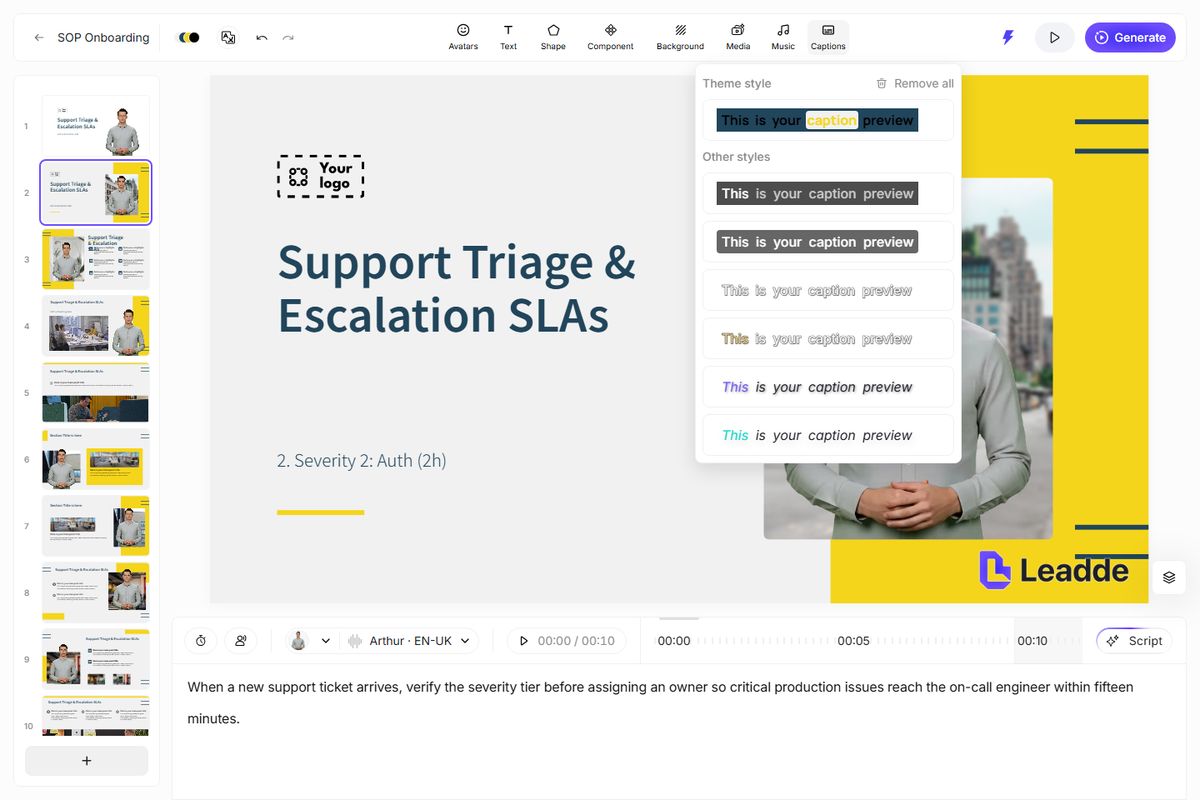
Inside the editor, each onboarding beat lives on its own slide: Scene 1 covering ticket severity definitions, Scene 2 showing the Slack escalation channel format, and Scene 3 detailing customer follow-up SLAs.
The reviewer checks the script on each slide, trims any wordy phrasing, and enables synchronized captions before publishing.
Patching Single Scenes When Internal Processes Change
The real payoff of a scene-editable workflow arrives three months later when your startup updates its pricing tiers or switches issue trackers. In a traditional screen recording, changing one step invalidates the whole file.
When each step of an onboarding module is stored as an independent slide with editable text layers, screenshots, and per-scene voiceover tracks, maintenance stays lightweight.
The owner opens the existing project, selects Scene 4, swaps the outdated screenshot for the new interface capture, edits two sentences in the script box, and re-exports the updated module. New hires joining the following Monday see the current process without anyone booking a studio or re-recording the other scenes.
Three Questions Founders Ask Before Standardizing Video Onboarding
1. At what headcount does structured video onboarding pay for itself?
The inflection point usually arrives when you hire more than two people a month or operate across multiple time zones. If department leads repeat the same foundational walkthrough more than three times a quarter, converting that SOP into a three-minute scene-based video recovers hours of senior leadership time immediately.
2. How long should each onboarding video be?
Keep individual modules between two and four minutes, centered on a single workflow or mental model. A new hire is far more likely to finish and retain four focused three-minute videos embedded inside their Day 1 to Day 5 Notion checklist than a single twenty-minute briefing covering the entire company.
3. How do we prevent onboarding videos from going stale?
Assign every onboarding video the same owner who maintains the underlying written SOP, and store the editable project link right at the top of the internal wiki page. Whenever a quarterly process review updates the written checklist, the owner patches the corresponding scene in the video project on the same afternoon.